Supplies Needed
The PTU scrap kit I am using was created by Ladyhawwk Designs and is inspired by the Artwork of Pin Up Toons. Click HERE to view and/or purchase this kit.
You can buy the tube 162-2 Pin Up Toons by clicking HERE.
I am using a FTU template by Scraps of Enchantment ~ Its template #128
I am using the PTU Pinup Toons (PUT) artwork by Rion Vernon. You must have a license to use his artwork. You can purchase tubes and a license at CDO.
I am using version PSP 9 ~ No outside filters used
Remember that this is your own creation ~ You can change around papers
and elements as you like ~ My tutorial is for use as inspiration so have
fun!
Let's get creative!
This is assuming that you are using the same scrapkit and tube as I am. Please adjust your colors and sizes of tube if you are using something different
If you are not familiar with using a template now is a great time to learn so have patience and don't be afraid to change things up
If you are not familiar with using a template now is a great time to learn so have patience and don't be afraid to change things up
I use the same instructions throughout tutorial so I will make it easier to follow by abbreviating
CP ~ Copy and Paste
SSAFD ~ Selections, Select All, Float, Defloat
SID ~ Selections, Invert, Delete
SSN ~ Selections, Select None
Open your template ~ Shift D and close out your original ~ Delete the
Info layer, flower layer, stars layer and bottom (blank) raster layer
Click the rainbow layer on your template, Adjust, Hue and Saturation, Colorize
Settings :: Hue at 1 and Saturation at 145
Each layer in the template is named so just follow along and click each one as it is used below
White Rounded Square ~ SSAFD ~ CP paper 1 ~ SID ~ SSN ~ Delete White Rounded layer
Pinklayer1 ~ SSAFD ~ CP paper 6 ~ SID ~ SSN ~ Delete Pinklayer1
PinkCircle1 ~ SSAFD ~ CP paper 5 ~ SID ~ SSN ~ Delete PinkCircle1
White Circle 1 ~ SSAFD ~ CP paper 4 ~ SID ~ SSN ~ Delete White Circle 1
Grey Circle1 ~ SSAFD ~ CP paper 5 ~ SID ~ SSN ~ Delete Grey Circle1
Greylayer1 ~ SSAFD ~ CP paper 2 ~ SID ~ SSN ~ Delete Greylayer1
Black Layer1 ~ SSAFD ~ CP paper 1 ~ SID ~ SSN ~ Delete Black Layer1 ~ Move this new layer below your circles
Open your tube ~ Shift D and close out original
Now if you purchased the 162-2 PUT Tube you will have 3 sizes to your tube ~ Layer 1 is the smallest so activate that layer ~ Image Mirror
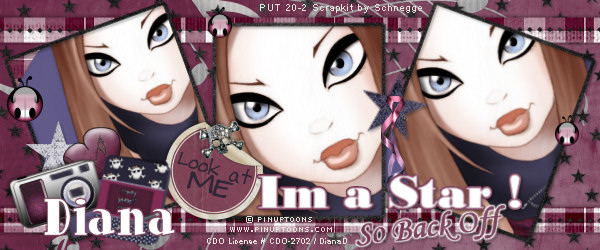
Back to your template ~ Grey Rounded Square2 ~ SSAFD ~ CP your tube layer we just mirrored ~ Position the face in the marching ants square ~ SID ~ SSN ~ Delete Grey Rounded Square2 ~ Position like my tag preview
Grey Rounded Square1 ~ SSAFD ~ CP tube layer 3 (largest tube in the 3) and position face in the marching ants square ~ SID ~ SSN ~ Delete Grey Rounded Square1 ~ Position like my tag preview
C&P layer 2 (medium size) tube onto your tag template ~ Image ~ Resize ~ 68% resize all layers unchecked ~ Position like my tag
Starting at the top of your tag layers click each layer and use drop shadow ~ I use 2 / 2 / 25 / 3 black ~ Start at the top again and change the first two numbers to -2
Click the top layer in your tag template
This is where your creativity and fun come in ~ Choose any elements you like, resize if needed and positon to your liking ~ Add the same drop shadows
When you are happy with your tag resize all layers to 76% ~ Layers ~ Merge ~ Merge Visible ~ Adjust ~ Sharpness ~ Sharpen
Add your copyright and/or licensing information ~ Merge ~ Merge Visible
Add your name/text
Save as a PNG
Please feel free to share with me your finished creation so that I can show it off here on my blog ~ If you have any feedback, a question or notice a mistake please let me know
I hope you have enjoyed this tutorial
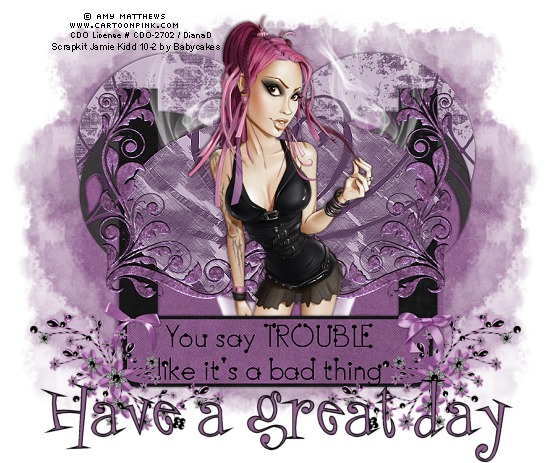
Tag showoff by my friend Dottie who tried this tut out :) Thank you Dottie!

Tag showoff by my friend Dottie who tried this tut out :) Thank you Dottie!